Manufacturing Quality Management, Connected. Simplify Quality. Connect Every Step.
EasyQualityFlow connects APQP, FMEA, Control Plans, MSA, SPC, Inspection, PPAP, NCR, CAPA and audit evidence in one digital quality platform — so a characteristic entered once on the part is the same one every document downstream reads.
Already have an account? Login
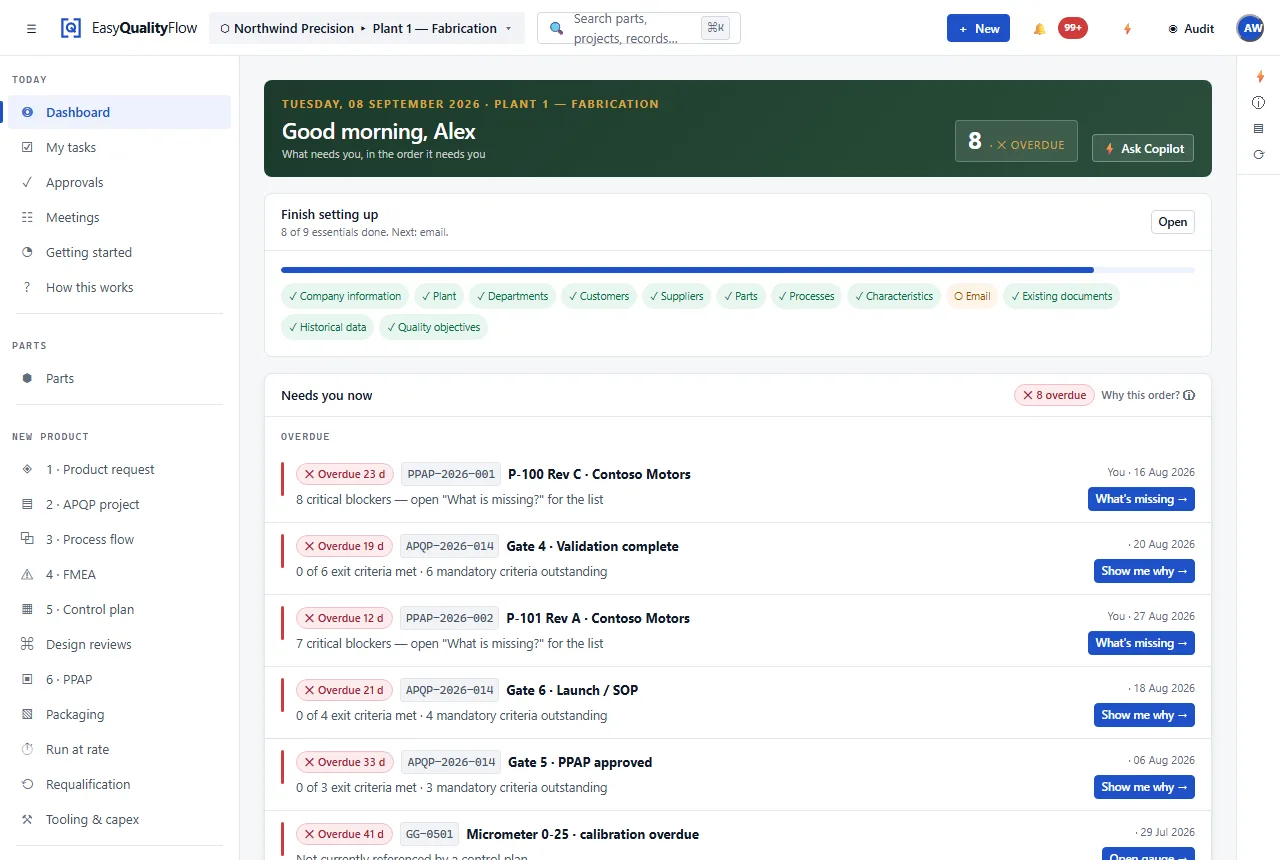
Open it on a Monday and it tells you what is waiting.
Not a landing page for a quality system — the quality system. Overdue activities, documents waiting on an approval, submission elements still outstanding and a control chart that has gone out of control, on the screen you land on.
One Part. One Connected Quality Thread.
Follow a single part from the customer’s requirement to the audit that asks about it. Choose a stage to see what it hands to the next one — and what nobody has to do by hand any more.
Requirements
Customer requirements, drawing revision and the characteristics taken from them.
Carries forwardThe characteristic list, with tolerance, class and the drawing revision it came from.
No longer done by handReading the same drawing four times into four different documents.
Part
The part record everything else hangs on — number, revision, customer, plant.
Carries forwardOne identity for the part, so every later record can point at it instead of naming it.
No longer done by handReconciling “P-101 Rev C” against “P101-C” across five spreadsheets.
APQP
The launch as a project: phases, activities, owners, dates and approvals.
Carries forwardA list of the documents this launch owes, and the date each is due.
No longer done by handA tracker spreadsheet that is a copy of the plan, kept up to date by hand.
Process
The operation sequence, and which characteristic each operation makes or verifies.
Carries forwardThe operation list, which the risk analysis and the control plan are both built on.
No longer done by handTyping the same operation sequence into the flow, the PFMEA and the control plan.
FMEA
Design and process risk in AIAG-VDA structure, with revisions and a review workflow.
Carries forwardFailure modes, causes and the prevention and detection controls chosen for each.
No longer done by handStarting a PFMEA from a blank template instead of from the process you already entered.
Control Plan
What is measured at each operation, to what specification, with which gauge and how often.
Carries forwardThe controls, which become the inspection plan the shop floor actually works to.
No longer done by handCopying characteristics out of the PFMEA and hoping the tolerances survived the trip.
MSA
Gauge R&R, bias, linearity, stability and attribute agreement against the gauge in the plan.
Carries forwardA verdict on the measurement system, attached to the gauge and the characteristic.
No longer done by handA study in a spreadsheet that no submission can point at.
Inspection
Results against specification, with the gauge that took them and its calibration state.
Carries forwardMeasured values, which the charts read and a failure turns into a nonconformance.
No longer done by handRe-keying results from a paper sheet into a chart workbook at the end of the shift.
SPC
X̄–R charts, control limits, Nelson rules and Cp / Cpk / Pp / Ppk.
Carries forwardCapability figures a submission can cite, and a signal that points back at its control.
No longer done by handRebuilding a control chart because the data arrived in a different column order.
PPAP
The submission, with elements set by the customer’s own requirement profile.
Carries forwardA package assembled from records that already exist, and a list of what is still missing.
No longer done by handThe folder chase — hunting the current revision of eighteen documents a week before it is due.
Production
Ongoing results against the same characteristics, under the same controls.
Carries forwardA running record of how the process actually behaves once it is making parts.
No longer done by handDiscovering at the annual review that nobody kept the ongoing data.
NCR / CAPA
A nonconformance, its containment, its cause, and the action that changes the system.
Carries forwardA verified corrective action, and a change to the risk analysis that stops the repeat.
No longer done by handA corrective action closed on assertion, in a spreadsheet with a status column.
Audit
Requirement, risk, control, evidence, result and action, gathered by scope.
Carries forwardThe evidence chain, produced from the records rather than compiled for the occasion.
No longer done by handThree days of assembling a binder before an auditor arrives.
One Quality Platform. One Connected Workflow.
Five layers, and the boundaries between them are where the work usually leaks. Here they are the same system, working on the same records.
Product lifecycle
What a launch owes, and what it produces.
Risk & process
How the part gets made, what can go wrong, and what catches it.
Quality execution
Measuring the part, and trusting the measurement.
Governance
The rules the records live under, and the evidence they become.
Nonconformance
A failure recorded against the characteristic and the operation it happened at.
Learn moreCAPA & 8D
Containment, root cause, corrective action and an effectiveness check before closure.
Learn moreAudit Mode
Requirement, risk, control, evidence, result and action, gathered by scope.
Learn moreDocuments
Controlled documents with revisions, states, approval routes and distribution.
Learn morePeople & gauges
Who is qualified for what and when it expires; which gauge is in calibration.
Learn moreCustomer requirements
What each customer asks for, held against the customer rather than in a folder.
Learn moreRequirement profiles
A reusable rule set per customer: required elements, naming, sequence, approval.
Learn moreForm templates
The output format a customer expects, filled from the structured record.
Learn moreObjectives & management review
What the company said it would achieve, measured monthly.
Quality objectives
Company objective, the department that took it on, and the KPI underneath — with the target signed off before the year is measured against it.
Learn moreMonthly KPI entry
One figure per KPI per month. Achievement, status and every roll-up above it are calculated from it rather than kept up to date by hand.
Learn moreManagement review
The month’s position, the decisions taken and the actions assigned, held as a record rather than as a slide deck somebody retypes.
Learn moreBeing built next, and not in the platform today: supplier quality — incoming inspection, supplier PPAP, certificates and scorecards — and the shop-floor layer that runs every shift. Both are described as planned wherever they appear on this site.
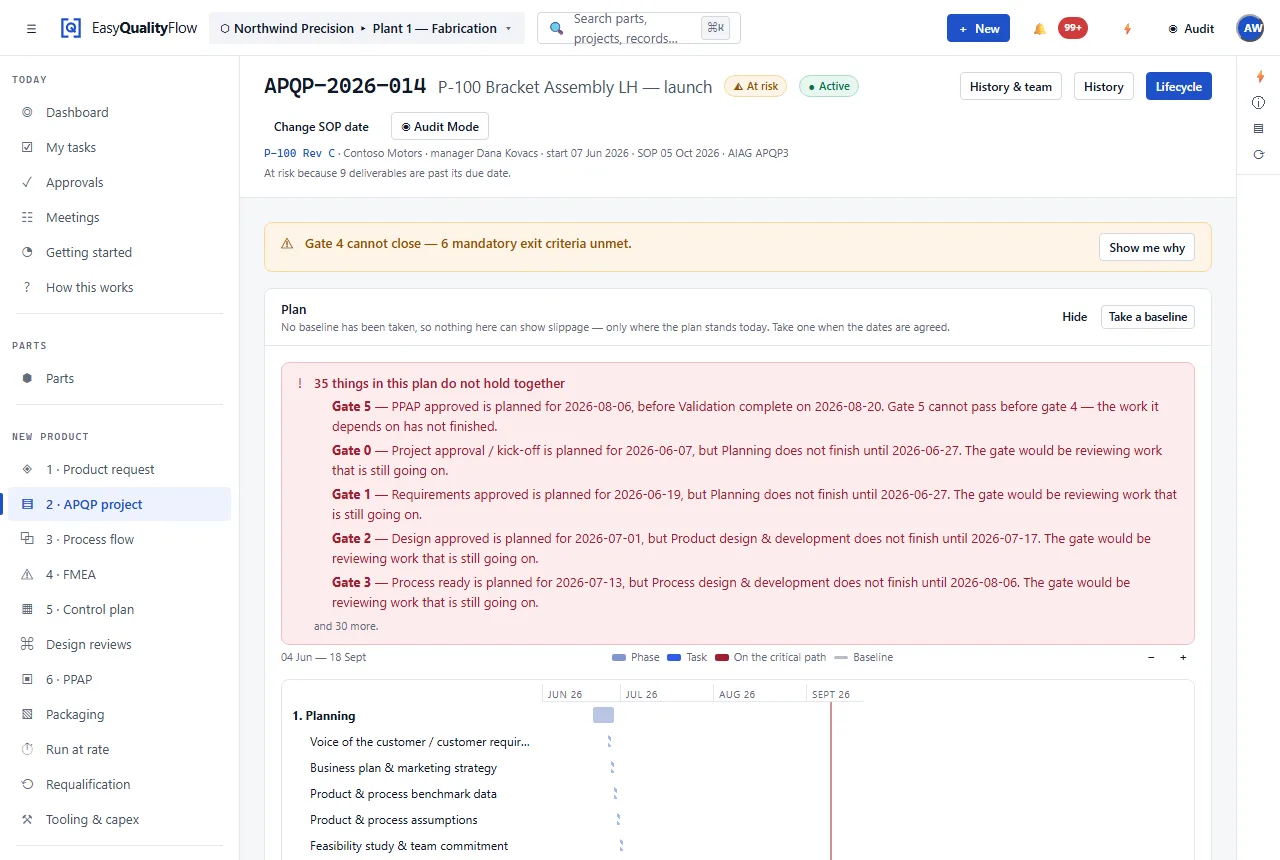
Plan Quality Before Production Begins.
APQP is the planning layer the rest of the launch hangs from: it says which quality documents this part owes, who owns them and when they are due.
- Projects against a part and a customer
- Phases and activities with owners and due dates
- Status visible as work rather than a tracker tab
- Approvals recorded against named people
- Documents attached to the activity that produced them
- Milestones and phase completion
Identify Risk Before It Becomes a Problem.
Design and process risk analysis in one place, in AIAG-VDA structure, with the revision history and review workflow a controlled document needs.
Design risk analysis
What can go wrong with the design, and what the design does about it.
Process risk analysis
What can go wrong at each operation, and which control catches it.
Failure modes, effects, causes, prevention controls, detection controls, risk evaluation and actions — with revisions and a Draft → Review → Released state.
EasyQualityFlow implements the AIAG-VDA method and terminology. It is not an AIAG or VDA product and carries no endorsement from either body.
Explore FMEA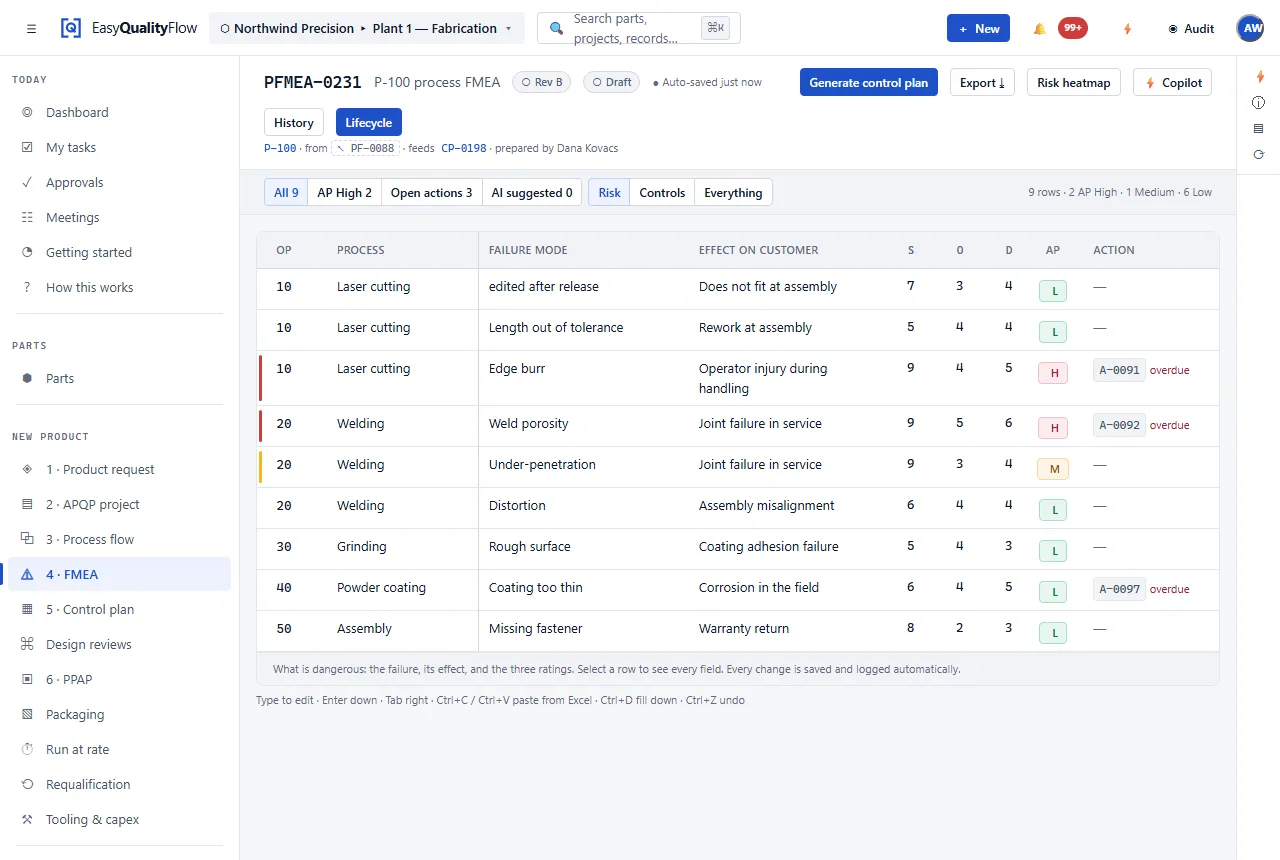
Build Customer-Ready PPAP Without the Spreadsheet Chase.
A submission is not a folder. It is a list of required elements, and most of them are documents you already produced upstream — so the work is assembly, and assembly is exactly what a person should not be doing by hand a week before it is due.
Which elements are required comes from the customer’s requirement profile, so two customers asking for different things is configuration rather than two parallel processes. Each element shows what evidence is attached, what state it is in, and what is still outstanding.
- Readiness as a percentage, computed from the elements — not typed in
- Missing elements named, not counted
- Revision checks: evidence pinned to the revision it was produced against
- Evidence linked to the record that produced it, never re-uploaded
- Approval state per element, against a named person
- The package built from the records, in the customer’s own format
Readiness is deliberately the lower of two halves — how complete the evidence is, and how much of it has been approved — because a submission that is fully collected and entirely unapproved is not 90% ready.
Explore PPAP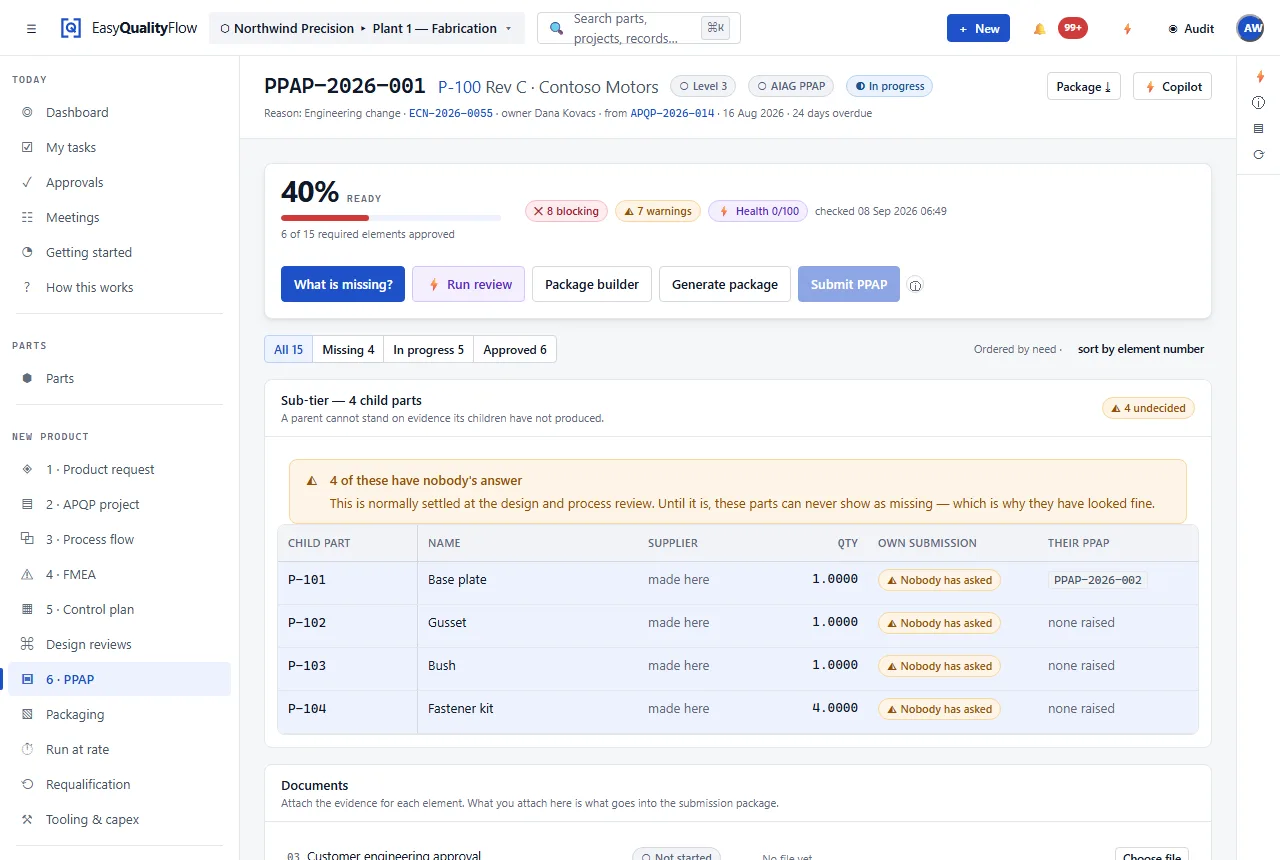
Turn Process Knowledge Into Controlled Execution.
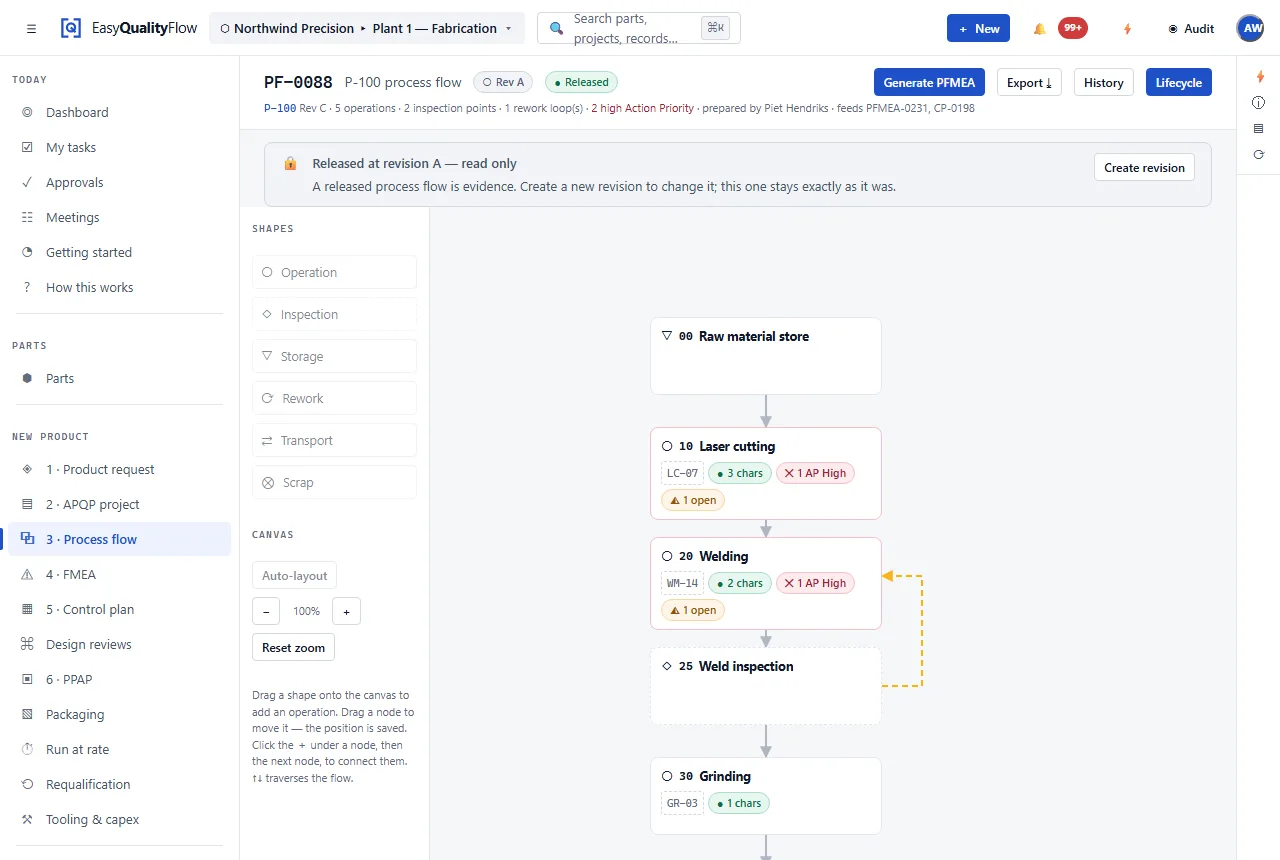
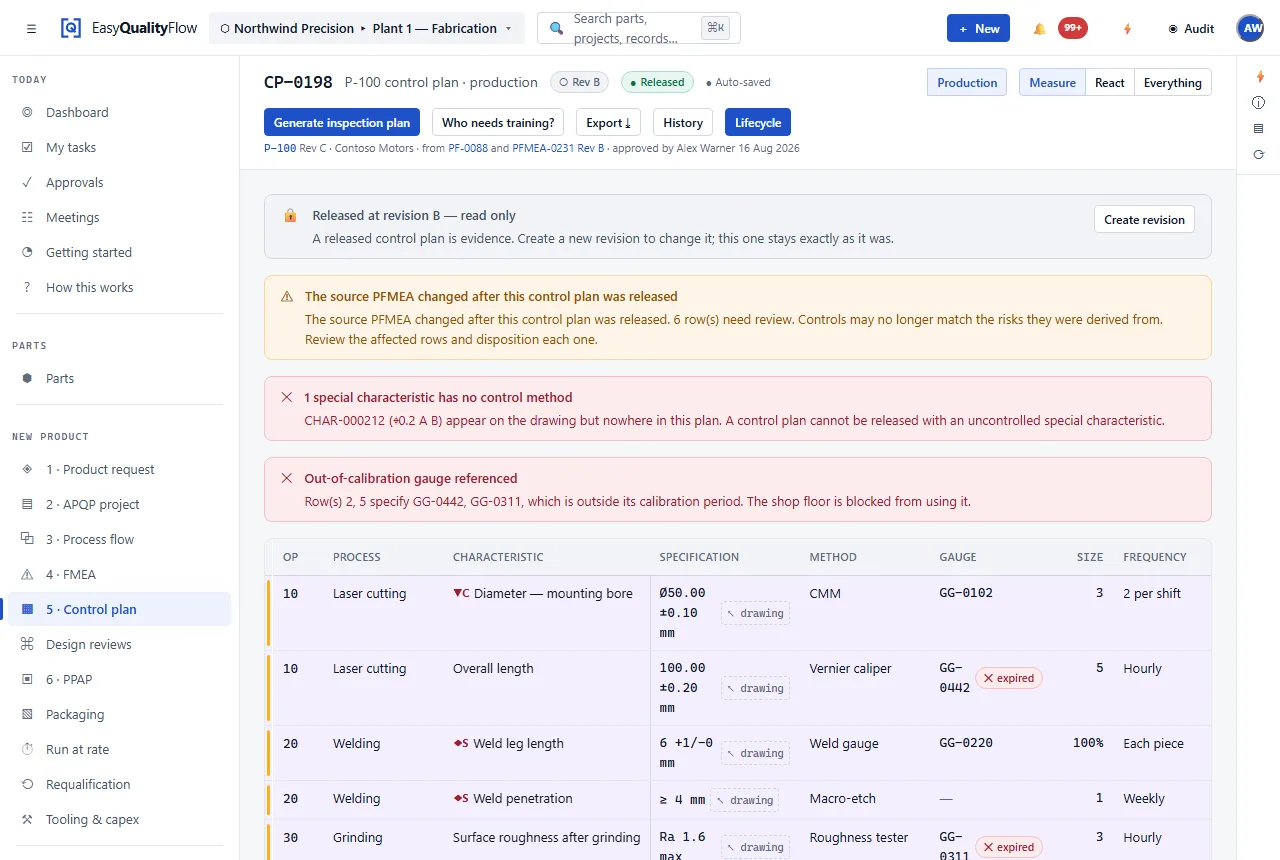
The operation sequence is the spine. Characteristics attach to operations, operations become PFMEA rows, and the control plan says what is actually checked.
Capture Quality Where It Happens.
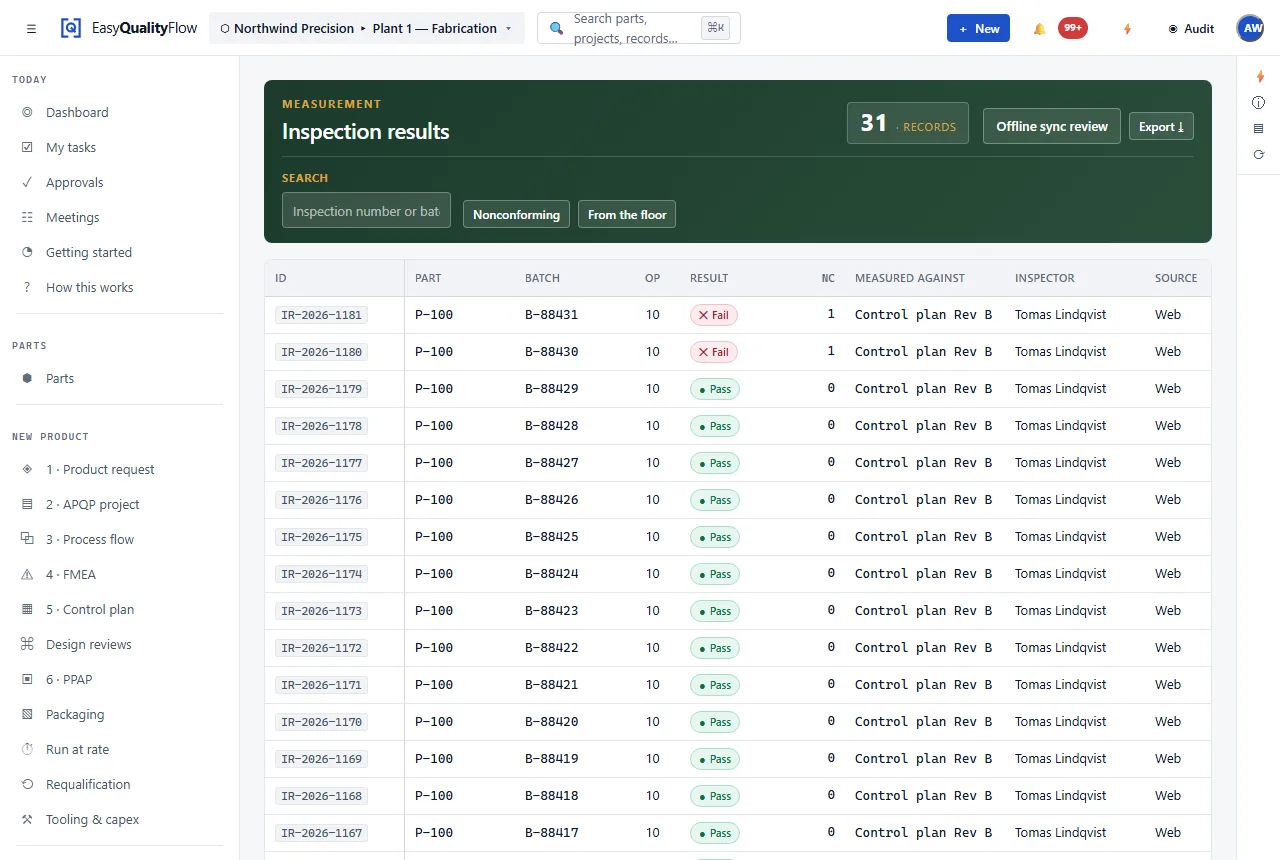
A result is only evidence if it says what was measured, against which specification, with which gauge, and whether that gauge was in calibration.
- The part and the characteristic being checked
- The specification it is checked against
- The measured value
- The gauge used, and its calibration state
- Pass or fail, recorded against the lot
See Process Variation Before It Becomes a Defect.
A part inside tolerance is not the same as a process in control. Control charts show the difference, and they show it before the tolerance is breached.
- X̄–R charts with calculated control limits
- Nelson rules for out-of-control signals
- Cp, Cpk, Pp and Ppk capability indices
- Signals traced back to the characteristic and operation
- Data recorded from inspection rather than retyped
These are the standard calculations, computed from your recorded results. The product does not claim predictive analytics — that is on the roadmap below, not in the product.
Explore SPC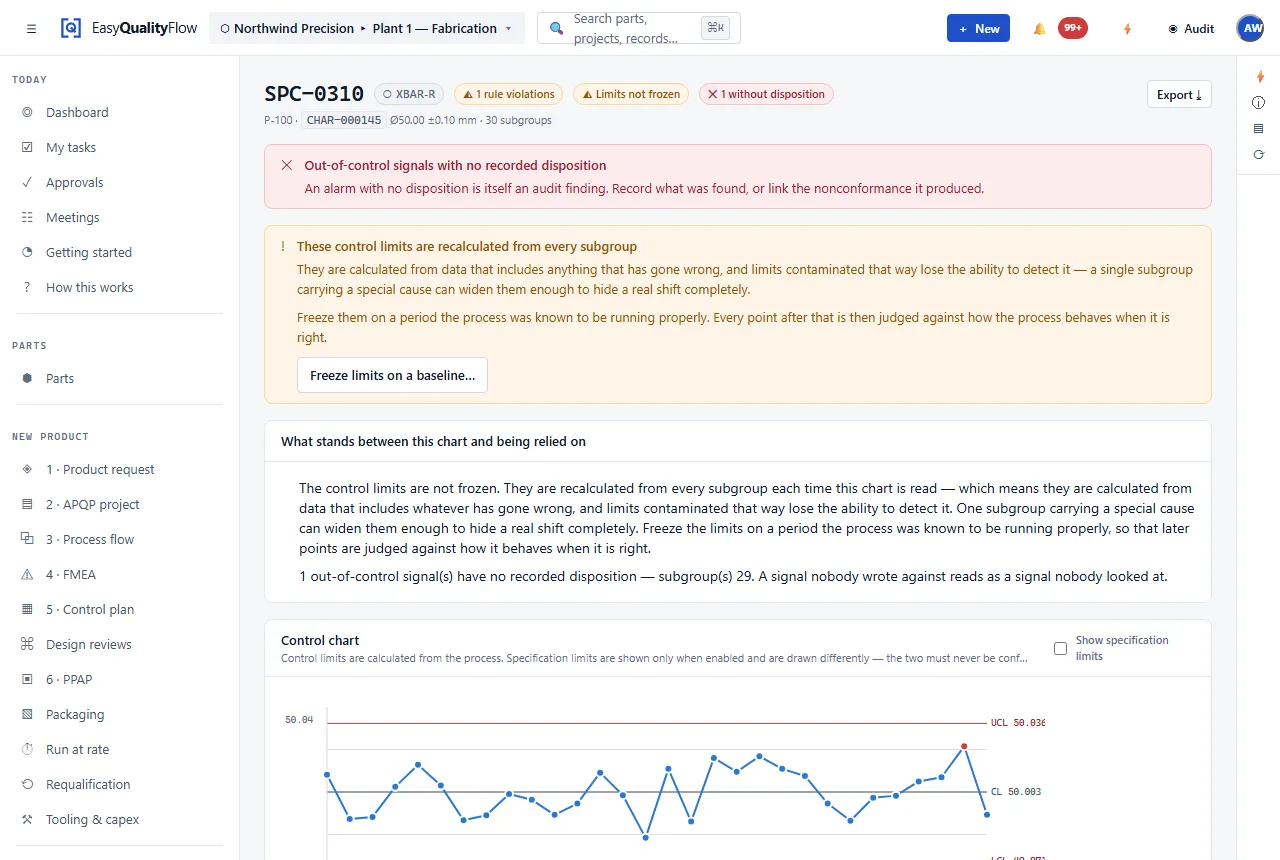
The system checks the work for you.
Not a dashboard of what you already know. A set of rules that read the records against each other and say what does not add up — before a customer, or an auditor, says it first.
These run over the actual data: the drawing, the control plan, the inspection results, the studies, the approvals and the dates. Each finding names the record it is about, so it can be opened rather than investigated.
This is deterministic. Every one of these is an explicit rule with an explicit threshold, not a model making a guess — which is why a finding can always be traced to the two records that disagree. There is no AI in the product today; what is planned is listed further down and labelled as planned.
Quality Needs More Than Forms.
The layer that makes quality records hold up: who approved what, which revision it was, what the customer asked for, and where the document is.
Quality
Nonconformances, 8D investigations and corrective actions, linked to the part and the process.
People & Gauges
Who is qualified for which work, and which gauge is in calibration.
Customers
The customer record every submission and requirement hangs from.
Customer Requirements
What a specific customer asks for, held against that customer.
Requirement Profiles
A reusable rule set per customer — required elements, naming, sequence, approval.
Approval Routes
Who approves what, in which order, before release.
Documents
Controlled documents with revision, state and change history.
Form Templates
The output format a customer expects, filled from structured data.
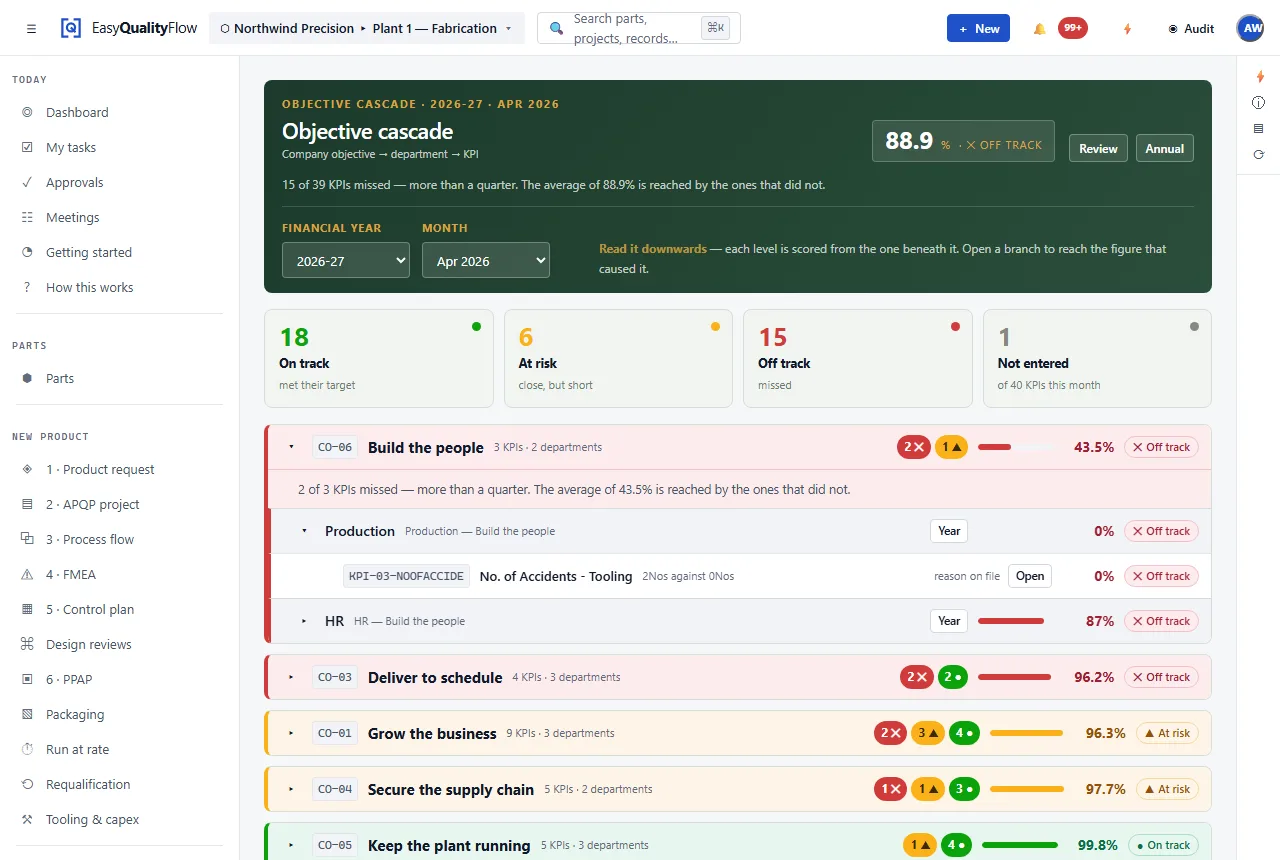
What the company said it would achieve, measured monthly.
One figure per KPI per month. Everything above it — the department’s position, the company objective, the year — is calculated from that figure rather than kept up to date by hand in a deck.
- Company objective → department objective → KPI, read downwards
- Targets approved before the year is measured against them
- A KPI contributes at most 100% to its parent, so one runaway number cannot carry a failing set
- Status uses the score and the count of red KPIs — a good average over three misses is not green
- Every status carries the sentence that explains it
- The review pack is built from the same figures the screen shows
The screen reads 88.9% and still says off track, because 15 of 39 KPIs missed. A number that flattered the year would be easier to draw and worth less.
Close the cause, not the ticket.
A corrective action that ends at the part comes back. The steps below exist in this order for a reason: containment protects the customer while the cause is still unknown, and the effectiveness check is what separates a fix from a hope.
Structured root cause
Five-why and fishbone held as data — categories, branches and the chain of whys — rather than a picture pasted into a document. The reasoning can be reviewed, not just admired.
Containment first
What is protecting the customer today is recorded before the cause is known, and separately from the permanent fix. That is the whole point of D3.
Effectiveness before closure
A CAPA cannot be closed on assertion. The check has its own date and its own evidence, taken after the action has been in place long enough to mean something.
Prevention that lands somewhere
D7 raises the change to the FMEA and the control plan and links to it. It does not edit a controlled risk document by itself — a person still decides what the new analysis says.
Read-across
Which other parts, processes and lines share the cause, asked while the investigation is open rather than a year later on a different line.
Back to where it started
The investigation keeps its link to the nonconformance, the complaint or the audit finding that raised it, and to the control that should have caught it.
Start With What You Have.
No ERP? That is not a limitation to work around here. A company with a shelf of spreadsheets and a folder of drawings is a first-class customer, not a lesser configuration.
Parts, customers, processes and characteristics can be typed in or imported from the Excel files you already keep. The setup checklist counts what actually exists in your data rather than asking you to tick items off, so “done” means a record exists.
See how a company startsConnect later, when you want to:
Four numbers, read from the source that defines them.
Every figure below is counted out of the product’s own code when this page is built. Add a rule and this page changes; remove one and it changes back. None of them is typed in, and none of them is about anybody else’s company.
Missing evidence, revision mismatches, specification disagreements, capability shortfalls and overdue actions — found by rule, not by review.
The customer’s requirement profile decides which of them this submission owes.
Audit Mode assembles the chain for one part and states the gaps in full.
Plus control limits, capability indices, and the reason a signal was raised.
The same work, without the reconciliation.
Nothing here criticises spreadsheets. They are excellent at holding numbers and hopeless at holding relationships — which is exactly what a revision tests.
Seven places, one number
- Excel — a separate file per document, and per revision
- Email — where the approval lives, and where it stays
- Folders — named after the month, or after whoever made them
- Manual copying — the control plan re-typed out of the PFMEA
- Version confusion — revision B on the floor, revision C in a folder
- PPAP assembly — eighteen documents hunted the week before it is due
- Audit evidence — three days of building a binder, per audit
One connected quality system
- One record per part — the characteristic entered once
- Approval routes — recorded against a named person, with a date
- Documents — a revision and a state on the document itself
- Derivation — operations become PFMEA rows and control plan lines
- Supersession — the old revision marked, not deleted, and never in doubt
- Assembly — the submission built from records that already exist
- Audit Mode — evidence gathered by scope, gaps included
Built around how quality engineering actually works.
Six things the product is organised around. They are design decisions, not slogans — each one shows up as a constraint somewhere in the software.
Enter once
A characteristic is created on the part and referenced by the PFMEA, the control plan, the inspection plan and the submission. It is not copied into them — which is why a revision change reaches all four instead of three.
Connect every step
APQP, FMEA, control plan, MSA, inspection, SPC and PPAP are separate screens over one record. A signal on a chart can be followed back to the control that was supposed to catch it, and forward to the action raised about it.
Eliminate manual work
The operations you entered become PFMEA rows and control plan lines. The submission is assembled from records that already exist. Nothing here is a form builder waiting for you to fill it in twice.
Built for auditability
Every critical record carries a revision, a state and a recorded approval against a named person. Audit Mode gathers requirement, risk, control, evidence, result and action by scope — and states the gaps rather than hiding them.
ERP optional
An ERP is one optional read-only source, never an assumption. Import from Excel is a first-class path, not a migration tool, because for many companies it is the permanent one.
Customer ready
A requirement profile holds what a given customer asks for — which elements, what naming, whose approval — so two customers wanting different things is configuration rather than two parallel processes.
One record, seen from each seat.
Quality Manager
See which launches are on plan and which documents are waiting on an approval.
Quality Engineer
Build the PFMEA and control plan from the process you already entered, and keep revisions straight.
APQP Engineer
Run the project by phase and activity, with owners and dates, instead of a spreadsheet tracker.
Manufacturing Engineer
Define the operation sequence once and have quality planning build on it.
Process Engineer
Tie each characteristic to the operation that produces it and the control that catches it.
Supplier Quality Engineer
Hold each customer’s requirements against that customer, and see what a submission still owes.
NPI Team
Work one connected launch record instead of passing files between functions.
Quality Leadership
A single view of quality planning activity across parts and customers.
Wherever a part has to be planned, controlled and proven.
The method came out of automotive, and it travels. What these industries share is a customer who wants the evidence, not just the part.
Automotive
APQP, PPAP and AIAG-VDA FMEA are the working vocabulary.
Aerospace
Controlled documents, traceable characteristics and recorded approvals.
Industrial manufacturing
Process planning and control across mixed product families.
Electronics
High characteristic counts and tight process control.
Medical devices
Design and process risk analysis with revision history.
Machinery
Low volume, high complexity, long document trails.
Precision manufacturing
Tolerance-driven inspection and capability monitoring.
Consumer products
Multi-customer requirements and repeatable submissions.
Listing an industry describes the workflows the product supports. It is not a claim of certification or regulatory approval for that industry.
Designed for Controlled Quality Data.
What follows is how the product is built. We are not going to show you certification badges we do not hold.
Separated by company
Each company’s data is scoped to that company, and the scoping is covered by an automated regression suite that fails the build if it weakens. It was written after a two-company test found a leak, which is the only reason to trust it.
Role-based access
What someone can see and do follows their role, and it is enforced by the server rather than hidden in the interface. A sweep across every route and every role runs as part of the build.
Secure authentication
Passwords are hashed and never emailed. Sign-in supports a one-time emailed code, multi-factor authentication and single sign-on, and repeated failures lock the account — a lock that survives a restart.
Controlled workflows
Documents move through defined states. Releasing one requires the approvals its route asks for, and an approved document is superseded by a new revision rather than quietly edited.
Recorded approvals
An approval is recorded against a named person with a timestamp, not against an anonymous account. The same is true of every signature on a submission.
Change history
Changes are written to an audit trail with who, what and when, and records know which revision they belong to — so evidence stays attached to the version it was produced against.
Backup and restore
The database and the stored files are backed up together, because either one alone is useless. The restore has been performed and verified, not merely scripted.
Controlled downloads
A file is served through a permission check against the record it belongs to. Distribution and acknowledgement are recorded, so who holds a copy is a fact rather than a memory.
The Future of Quality Engineering.
None of the following is in the product today. It is here because you should be able to see where it is going — not so it can be mistaken for what it does.
AI-assisted quality workflows
Assistance drafting risk analysis and control content from your existing records.
Intelligent document assistance
Help matching a customer’s expected format to the data you already hold.
Automated quality insights
Surfacing patterns across parts, processes and results.
Cross-document traceability views
Following a single characteristic across every document that references it.
Predictive quality analytics
Using historical results to indicate where variation is trending.
Smart recommendations
Suggesting controls and detection methods based on comparable processes.
Flexible plans for growing quality teams.
Pricing is not published yet, and we would rather leave this blank than put a number here we would have to change. Tell us the size of your team and what you need to submit, and we will give you a straight answer.
Straight answers
Is EasyQualityFlow a full quality management system or a set of tools?
Does it follow AIAG-VDA FMEA structure?
Do I need an ERP to use it?
Can it produce documents in my customer’s format?
What does it cost?
Is there AI in the product today?
Ready to simplify your quality workflow?
Bring APQP, FMEA, PPAP, process flow, control plans, inspection and SPC into one connected platform.
Questions? support@easyqualityflow.com